The fee is calculated based on the number of active accounts at the end of each month, and a tax invoice is issued via your registered contact (mobile/email).
The first month after signing up is completely free. However, after processing a leave of absence, suspension, or resignation, billing for that account will cease from the following month.
â» For inquiries regarding the billed amount, please use the [Contact Us] menu.
FunWorks Lite provides specialized administrator roles:
1. System Administrator: Comprehensive management over all system features.
2. HR Administrator: Overall HR functions, including employee registration and position management.
3. Accounting Administrator: Accounting features like drafting payment resolutions and expense approvals.
4. Collection Administrator: Collection-related features like collection approvals.
[Leave/Suspension/Resignation] To preserve and reference historical data, accounts can be converted to a 'read-only' state.
â» Note: To prevent unauthorized access by former employees, the administrator must change the account's password.
[Service Pause] If you request to pause the service, the fee is prorated for that period, and existing data is securely preserved.
[Service Cancellation] A 30-day grace period is provided upon cancellation. You can withdraw the request and continue normal use during this time, but all data is permanently deleted after the grace period ends.
[How to Request] Please select the appropriate category in the 'Support > Contact Us' menu to submit a cancellation or withdrawal request.
Various default templates like General Drafts, Expense Reports, and Leave Requests are provided. You can draft documents, set approval lines, and check status (pending, approved, rejected, etc.).
The 'System Administrator' can modify templates to use them according to company policies.
Documents requiring financial processing can include an 'Accounting Confirmation' step, and you can communicate in real-time with stakeholders using the 'Comments' feature within each document.
Only managers with 'HR Manager' permission can register new employees and handle tasks like setting work hours, managing leaves, and HR files.
Regular employees can only modify limited personal information (password, profile picture, contact info) directly on their [My Profile] page.
You can easily record check-in and check-out times via the attendance portlet on the main screen. This feature only works after an administrator registers the employee's work hours and allowed IPs.
Detailed personal attendance is viewable monthly in the [Attendance Management] menu. If a record is missing, you can submit a 'Change Request' for HR approval. Annual and half-day leave usage is automatically reflected in the attendance record.
Annual leave is automatically calculated by the system based on the fiscal year (Jan 1). New hires accrue 1 day per full month worked (up to 11 days) during their first year. From the next year, 15 baseline days are granted (fiscal year standard), increasing by years of service.
For exceptions like reward leaves or company policies, administrators can manually adjust(±) days via the [Adjust Leave] feature, reflecting instantly.
â» Leave Types: Accrued Leave (system granted), Adjusted Leave (admin manual adjustment), Total Leave (Accrued + Adjusted).
Project Binding: When drafting an approval document, selecting a related project automatically links them. You can grasp work history and cost analysis by project at a glance without having to search through numerous approval documents.
Google Drive Integration: If your company uses Google Drive, you can match it 1:1 with a project. You can instantly view, upload, and delete files within the system without needing to access the drive separately.
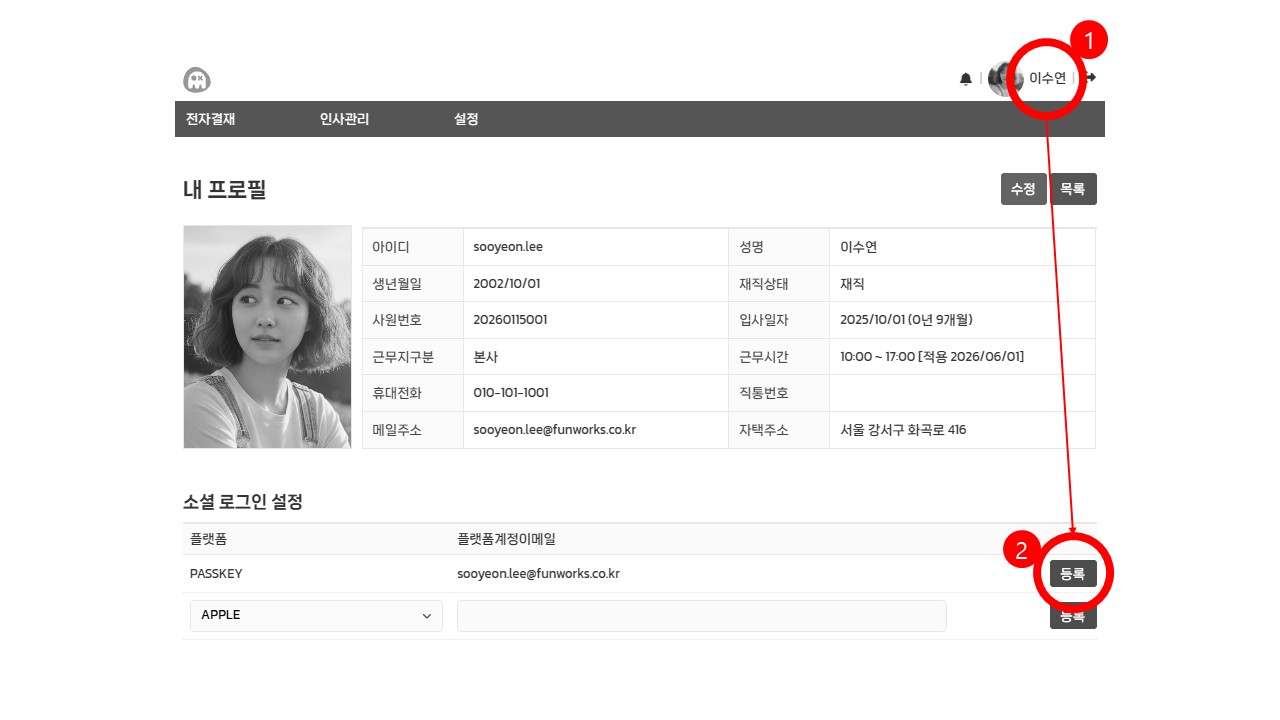
1. Click your [Profile Name] at the top right to visit the [My Profile] page.
2. Click the PASSKEY [Register] button in the [Social Login Settings] section at the bottom.
3. Complete registration following your device's instructions, such as fingerprint or Face ID.
Deposit Account: Woori Bank 1005-004-175020 (Holder: Funology Inc.)
Corporate representatives needing business registration or bankbook copies can request them via the customer center email (support.lite@funworks.co.kr).
Through PWA (Progressive Web App) technology, you can build your company's own dedicated e-approval app environment.
After accessing the service from your browser, click the [Install Web App] button at the bottom of the main screen to create a dedicated shortcut icon on your desktop/home screen.
If you register your company logo, a custom login screen exclusively for your company is provided, and the installed app name is automatically customized to [Company Name E-Approval]. Experience a fast, standalone work environment like a dedicated app without having to launch a browser separately.